
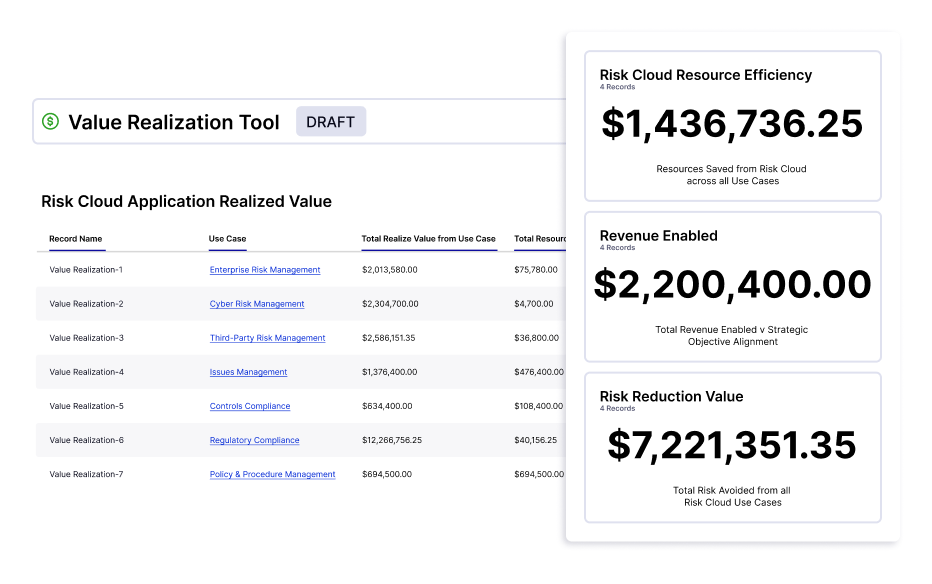
GRC programs impact the top and bottom line, but it can be a challenge to identify defensible metrics. LogicGate's Customer Support and Services team thoughtfully crafted a GRC Value Realization Tool to help you quantify the impact your program through automated, real-time insights.
This GRC Value Realization Tool is available to all LogicGate customers, including its implementation, at no additional cost. The value areas tracked within the tool include:
- Resource Efficiency - Quantify time savings by automating manual tasks and centralizing data.
- Revenue Enablement - Measure how GRC is necessary to drive revenue in the business through opening up new markets from compliance, driving better decision-making from leadership, and tying initiatives to business objectives.
- Risk Exposure Reduction - Measure how the efforts implemented by your teams allow the organization to take smarter risks.
What To Expect
- Removing Duplicative Work: Rather than requiring teams to go through a stressful exercise of painstakingly calculating what they were doing before, we use estimates and information that already exists within Risk Cloud to calculate outputs.
- Speaking the Language of the Business: “Risk levels,” “issue ratings," and “control effectiveness” can mean different things to different people, but everyone in the business understands dollars and time savings.
- Using Real, Defensible Data: GRC teams often encounter resistance when building business cases for efforts that lack a historical baseline for measurement. With Risk Cloud, the data is measured by the system allowing it to be easily justified.
How It Works
The Value Realization Too centralizes data from all applications to generate real-time reporting and produce key metrics showcasing the program's overall value. The inputs will then be used to automatically calculate time and resources saved by automation.
Automation Savings Example:
After working with LogicGate to establish their third-party risk management (TPRM) program in Risk Cloud, Acme Corp. shared that on average their hourly rate is $60 and, because of the complexity of communication with external vendors, each email takes an estimated ten minutes to compose. In addition, Risk Cloud sent 215 emails over the past month from the TPRM Application.
- Resource Rate: $60 / Hr
- Time per Email: 10 Minutes
- These ten minutes include identifying what email to send, who to send it to, drafting the wording, etc.
- Emails Sent Monthly: 215
- Annual Resources Saved from Automation:
($60 / Hr)*(1 Hr / 60 Minutes)*(10 Minutes / Email)*(215 Emails/Month)*(12 Months / Year) = 430 Hours or $25,800 Saved Annually from Automation
In addition, these inputs can be leveraged to calculate time saved from data connectivity (from the graph database) and time saved from ease of administration.
Risk Reduction Example:
Acme Corp. performs annual risk assessments against their enterprise risks. Each risk has a rated impact based on the financial impact & likelihood of occurrence; these are rated both in unmitigated and uncontrolled situations (inherent) and mitigated and controlled scenarios (residual). Gringotts can then measure the difference between the residual and inherent risks to see the impact their GRC program is making on reducing risk exposure across the enterprise.
- Inherent Impact: High ($2M)
- Inherent Likelihood: High (25%)
- Inherent Risk: High ($500K)
- Residual Impact: Moderate ($500K)
- Residual Likelihood: Low (5%)
- Residual Risk: Low ($25K)
Inherent Risk ($500K) - Residual Risk ($25K) = $475K Risk Exposure Reduction
Frequently Asked Questions
How much time does it take to set up the tool? On average, 1 hour per Application that you'd like to track value metrics for. Once the initial setup is complete, GRC teams can access the latest insights in a single click across all programs — freeing up valuable time for activities that drive strategic value.
How are these metrics calculated? This Tool pulls data directly from your Risk Cloud Applications in tandem with quantitative values provided by your team, for example average hourly pay rates.
How much does this cost? The Value Realization Tool, including its implementation, is included at no additional cost to LogicGate customers.
What's the next step to setting up the Value Realization Tool? Contact your Customer Success or Technical Account Manager who will:
- Upload the Application to your environment.
- Partner with you to define metrics, assumptions, and value.
- Personalize your application to reflect your GRC program.